Flowise AI
Freemium ✓ Verified 🔥 TrendingFlowise AI is an open-source low-code platform for building custom LLM apps, agents, and chatbots via a drag-and-drop flow editor.
📋 About Flowise AI
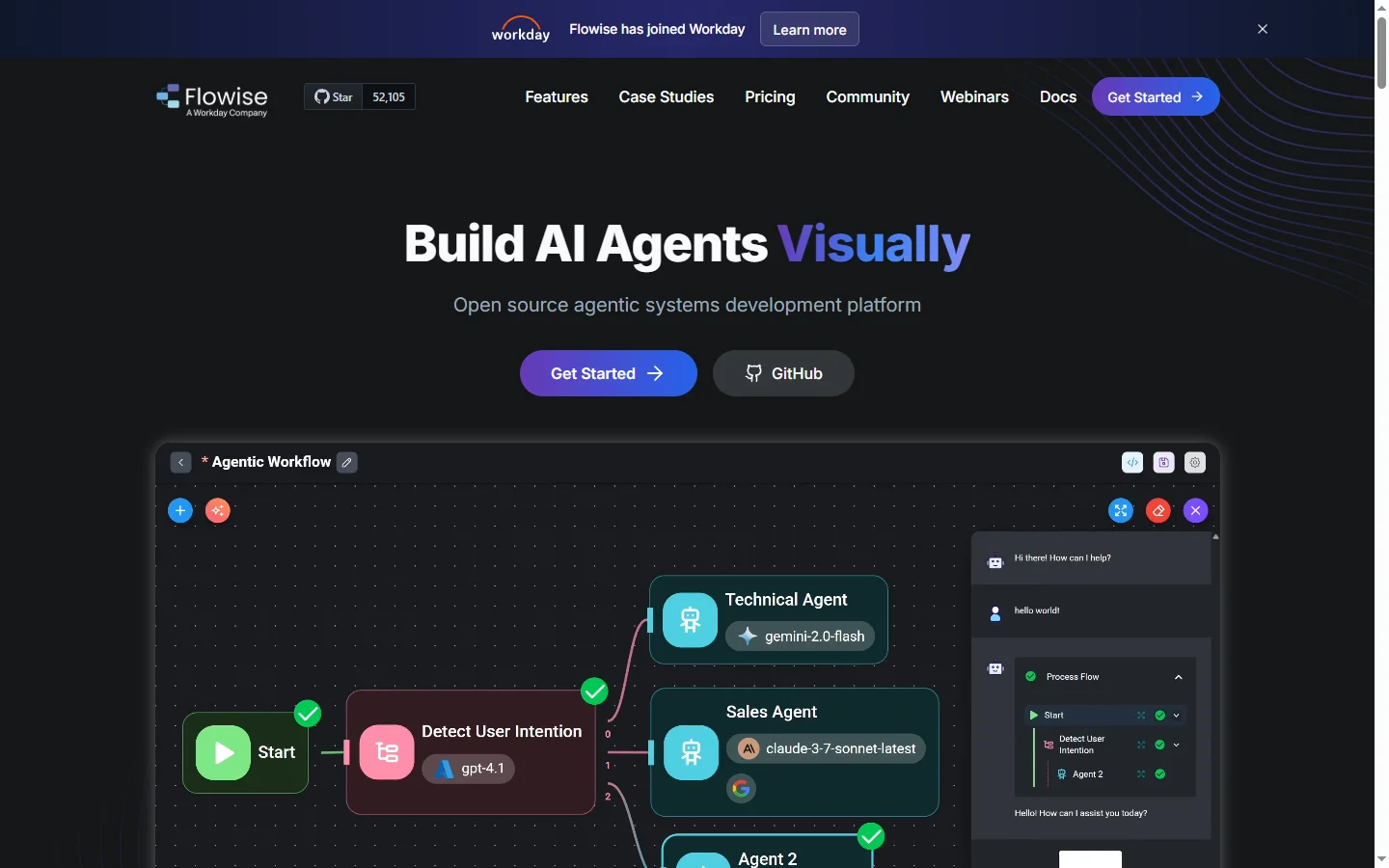
Flowise AI is an open-source low-code tool that lets developers and builders visually assemble LLM applications, agents, and retrieval-augmented chatbots through a drag-and-drop flow editor. Instead of writing glue code between vector databases, language models, and tool integrations, flowise ai users compose nodes on a canvas that represent each step of an AI workflow — data ingestion, embedding, retrieval, prompt construction, model invocation, and output handling. The underlying engine wraps LangChain and LlamaIndex primitives, so flows produced in Flowise can be exported, versioned, and deployed anywhere these libraries run.
The flowise ai project targets the large audience of product teams, consultants, and hobbyists who want to ship working LLM features without becoming full-time AI engineers. A typical build might ingest a directory of PDFs, embed them into a vector store, wire up a chat node with a chosen model, and expose the flow as an API or embeddable widget in minutes. For more advanced builds, flowise ai supports agents with tool use, multi-step chains, structured output, memory modules, and guardrails. Every node is inspectable, making it easy to debug how a prompt gets assembled or why a retrieval step returned the wrong chunks.
Flowise AI appeals to small teams launching internal chatbots, agencies delivering client LLM integrations, and developers prototyping concepts before committing to a fully coded implementation. The community edition is free and self-hostable, while a cloud offering provides managed hosting, authentication, collaboration, and observability for teams that do not want to run their own infrastructure. By combining a polished UI with an open core, flowise ai has become one of the most widely adopted visual builders in the LLM ecosystem.
⚡ Key Features of Flowise AI
Drag-and-Drop Flow Editor
Flowise AI provides a visual canvas where every component of an LLM application — loaders, splitters, embeddings, vector stores, models, prompts, and memory — is represented as a node that can be dragged, connected, and configured. The flowise ai editor feels similar to tools like n8n or Node-RED, which lowers the barrier for non-specialists to understand what an AI workflow actually does. Flows can be duplicated, versioned, and exported as JSON for sharing or git-based workflows. This visual representation is both easier to build with and easier to explain to stakeholders than raw code.
Wide Integration Catalog
The node catalog covers dozens of LLM providers (OpenAI, Anthropic, Google, Cohere, Hugging Face, Ollama), embedding models, vector databases (Pinecone, Chroma, Weaviate, Qdrant, Supabase), document loaders, and third-party tools. This breadth lets flowise ai builders swap components without rewriting their app when requirements change. New integrations land regularly thanks to active community contributions. For most common LLM stacks, users can assemble a production-grade flow without writing any glue code.
Retrieval Augmented Generation
Flowise AI makes RAG especially easy, with prebuilt templates for ingesting PDFs, websites, Notion docs, Confluence, and SQL, chunking them appropriately, and indexing them into a vector store. When a user query arrives, the flow retrieves relevant chunks, assembles a context-rich prompt, and asks the chosen model for an answer. The flowise ai debugging tools help builders inspect retrieved chunks to tune splitters, embeddings, and prompts. This end-to-end RAG experience is one of the platform's most popular use cases.
Agents and Tool Use
Builders can create agents that choose from a set of tools — web search, calculator, SQL query, API call, internal skill — to answer complex prompts. Flowise AI supports multiple agent architectures including ReAct, OpenAI function calling, and multi-agent supervisors, letting teams experiment with the pattern that fits their problem. Agents can include memory nodes that retain conversation history across turns. This moves flowise ai beyond simple chatbots into the territory of real agentic applications.
Embeddable Chat Widget and APIs
Every flow can be exposed as an HTTP API, a chat widget embeddable into any website, or a slash command for Slack and Discord. The flowise ai chat widget is customizable with branding, starter prompts, and behavior settings, which makes it quick to ship a production-looking assistant. APIs include authentication, rate limiting, and streaming responses out of the box. This reduces the amount of custom infrastructure teams need to build around their AI logic.
Self-Hostable Open Source
Flowise AI is distributed under an open source license and can be self-hosted via Docker, Kubernetes, or cloud platforms such as AWS and Render. This appeals to teams with compliance or cost requirements that preclude sending data to managed services. The open source repository is active and community driven, with a rich ecosystem of templates and integrations shared through GitHub. For teams that prefer to outsource operations, the managed cloud edition remains available.
Observability and Debugging
Each flow produces detailed logs of prompts, responses, tokens used, latency, and retrieved chunks, surfaced in an observability view that makes iterating faster. The flowise ai debugger can replay individual steps and mock inputs to isolate issues. Integrations with LangSmith, Langfuse, and other LLM observability tools are available for teams with existing tracing stacks. This tooling is key to moving from a prototype flow to a reliable production assistant.
🎯 Use Cases for Flowise AI
⚖️ Flowise AI Pros & Cons
Advantages
- ✓Open source and self-hostable for free
- ✓Wide catalog of LLM, vector, and tool nodes
- ✓Strong RAG and agent support out of the box
- ✓Exposes flows as APIs or chat widgets
- ✓Good observability tooling for debugging
Drawbacks
- ✗Complex flows can become hard to read at scale
- ✗Advanced scenarios may still require custom code
- ✗Hosting yourself requires DevOps knowledge
- ✗Enterprise features gated behind cloud plans
📖 How to Use Flowise AI
Install Flowise AI locally with Docker or sign up for the cloud edition at flowiseai.com.
Create a new flow and drag in nodes for your data source, embeddings, vector store, and model.
Connect the nodes to form the end-to-end logic of your LLM application.
Configure each node with API keys, prompts, and parameters.
Run the flow in the built-in chat to verify behavior and iterate on prompts.
Publish as an API or chat widget and embed it in your product or website.
❓ Flowise AI FAQ
Yes. The open source edition is free to self-host under a permissive license. A managed cloud edition is available with paid tiers for teams that want hosting, collaboration, and enterprise features.
Basic flows can be built without code, but understanding concepts like embeddings, vector stores, and prompts helps. Some advanced customizations benefit from JavaScript or Python knowledge.
Flowise AI integrates with OpenAI, Anthropic, Google, Cohere, Hugging Face, Ollama, and many others, so teams can pick the model that best fits their cost and privacy needs.
Yes. Built-in loaders ingest PDFs, websites, Notion, Confluence, and SQL sources, and the platform supports major vector databases for retrieval over your own content.
Flowise AI is a visual layer on top of these libraries. Teams often prototype in flowise ai and later port flows to code when they need deeper customization or tighter integration with their stack.
Related to Flowise AI

A2E AI
A2E AI productivity platform converts audio and video recordings into transcripts, summaries, and action items with speaker identification.

Abby AI
Abby AI is an AI therapy and mental wellness chatbot that offers CBT-informed conversations, mood tracking, and self-guided coping tools.

Abnormal AI
Abnormal AI uses behavioral AI to detect business email compromise, account takeover, and socially engineered phishing that bypasses secure email gateways.

Abridge AI
Abridge AI medical documentation platform that records and summarizes clinical conversations into structured physician notes in real time.

Amazon Bedrock
Amazon Bedrock is AWS's fully managed service for building generative AI apps using foundation models from Anthropic, Meta, Mistral, and more.

PandasAI
PandasAI is a conversational data analysis library that lets you query pandas DataFrames in plain English using large language models.
Featured on WhatIf.ai
Add this badge to your website to show you're listed on WhatIf AI
Alternatives to Flowise AI

A2E AI
A2E AI productivity platform converts audio and video recordings into transcripts, summaries, and action items with speaker identification.

Abnormal AI
Abnormal AI uses behavioral AI to detect business email compromise, account takeover, and socially engineered phishing that bypasses secure email gateways.

Abridge AI
Abridge AI medical documentation platform that records and summarizes clinical conversations into structured physician notes in real time.

Air AI
Air AI conducts autonomous full-length AI phone calls for sales prospecting, appointment setting, and customer service without human agents.