
Ninja AI
Freemium ✓ Verified 🔥 TrendingNinja AI is a multi-LLM agent assistant that combines chat, image generation, coding, research, and scheduling across top models in one unified interface.
📋 About Ninja AI
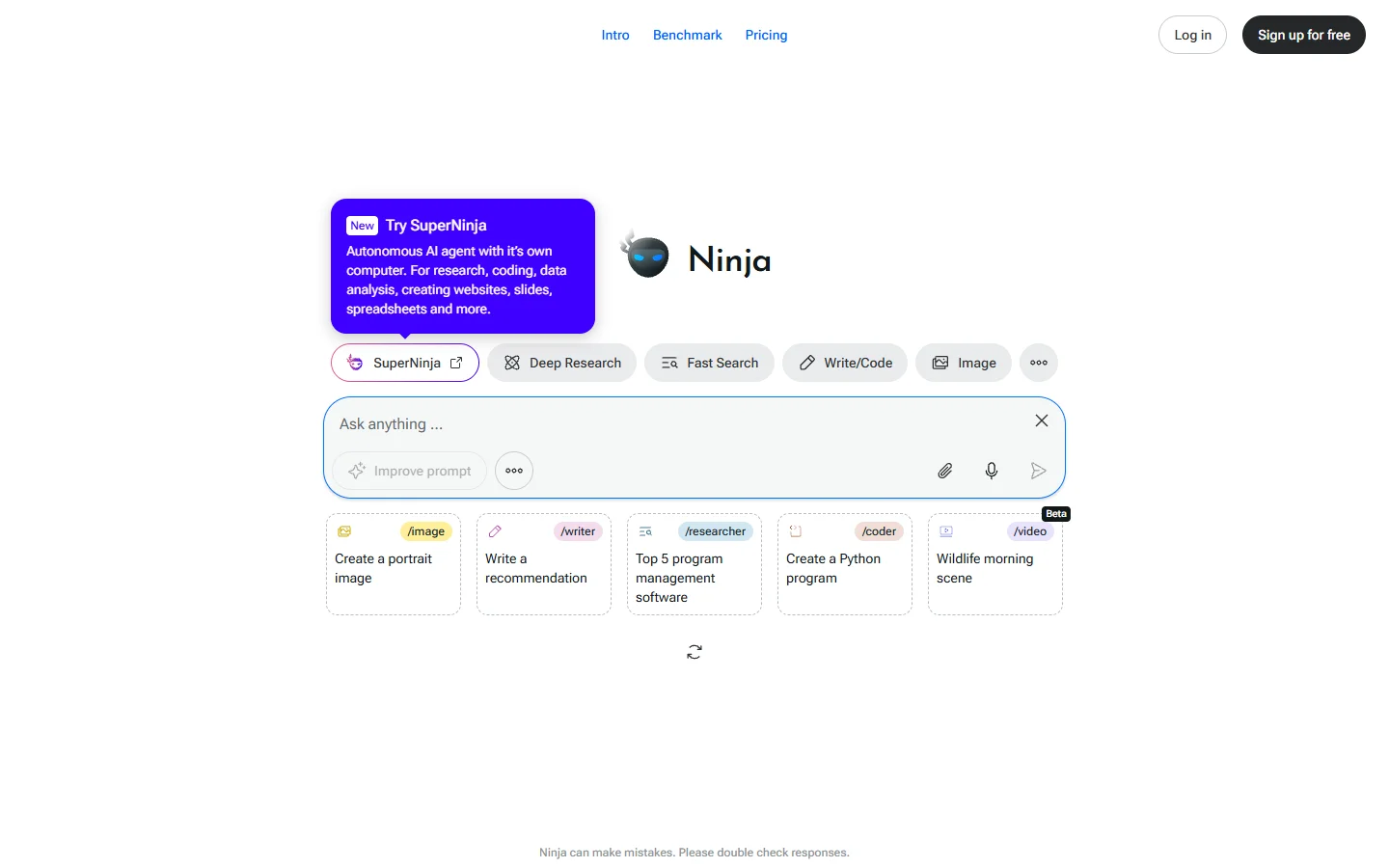
Ninja AI (myninja.ai) is a multi-LLM agent assistant that brings together leading models — GPT-4, Claude, Gemini, Llama, and others — under one chat interface and routes each request to the best engine for the task. Rather than forcing users to pick a model up front, the ninja ai assistant runs queries across multiple models in parallel, compares outputs, and surfaces the strongest answer. The result is a workspace where chat, image generation, coding, research, scheduling, and document work all live in a single conversation with persistent context.
The platform is built around specialized AI agents that handle different categories of work. The Writer agent drafts essays and emails, the Coder agent writes and explains code, the Researcher agent pulls live web data with citations, the Advisor agent answers consultative questions across finance and career topics, and the Scheduler agent coordinates meetings via email negotiation. Each ninja ai agent can call models from different providers depending on what produces the best result, and Ninja's SuperAgent combines them for multi-step workflows that touch several domains in one prompt.
Ninja AI is aimed at professionals, students, and small teams who want one subscription instead of paying separately for ChatGPT Plus, Claude Pro, Midjourney, and Perplexity Pro. Pricing starts well below the combined cost of those individual services, which has driven rapid growth. The myninja.ai interface includes mobile apps, browser extensions, and a developer API, and Ninja Pro plans offer higher rate limits, longer context retention, and access to premium models for power users. For people who want the breadth of the AI ecosystem without juggling multiple accounts, Ninja AI is one of the strongest unified options on the market.
⚡ Key Features of Ninja AI
Multi-LLM Routing Across Top Models
The ninja ai assistant runs queries across GPT-4, Claude, Gemini, Llama, and other leading models in parallel, then surfaces the strongest response or lets users compare answers side by side. This routing happens automatically based on the task type, but power users can pin specific models for specific kinds of work. The benefit is that you do not have to know which model is best at coding versus creative writing versus math — Ninja figures it out and adapts as new model versions ship. For mixed workloads, this consistently produces better answers than sticking with a single LLM.
Specialized AI Agents
Ninja includes purpose-built agents — Writer, Coder, Researcher, Advisor, and Scheduler — each tuned for a specific category of work with appropriate model choice, prompt engineering, and tooling. The myninja ai agents handle handoffs cleanly so a research task can feed directly into a writing task without losing context. This agentic structure produces sharper results than a single generalist model for domain-specific work like financial analysis or technical documentation. Users can call agents explicitly or let SuperAgent decide which to invoke.
Live Web Research with Citations
The Researcher agent pulls real-time web data and returns answers with linked citations, similar to Perplexity but routed through whichever foundation model handles the topic best. The ninja ai assistant evaluates source quality and clusters related results, which is particularly useful for competitive research, market analysis, and academic literature reviews. Citations are inline so users can verify claims and follow up on primary sources directly.
Integrated Image Generation
Generate images using top models like DALL-E, Stable Diffusion XL, and Flux from the same chat interface, with no need to switch tools or manage separate subscriptions. The ninja ai image agent routes prompts to whichever generator handles the requested style best — photorealism, illustration, product mockup, or icon design. This eliminates the cost of paying for both a chat assistant and a separate Midjourney or DALL-E subscription for casual image work.
Coding Assistant with Multi-File Context
The Coder agent writes, explains, debugs, and refactors code across most major languages, with support for uploading files and folders for whole-repository context. The myninja ai coder routes to whichever model produces the strongest answer per language — Claude for refactoring, GPT-4 for novel algorithms, and so on. Output includes runnable code blocks, explanation paragraphs, and follow-up suggestions for testing and deployment. The interface remembers project structure across sessions.
AI-Powered Meeting Scheduler
The Scheduler agent handles meeting coordination by emailing participants on your behalf, negotiating times across time zones, and dropping confirmed events on your calendar. This is one of the few ninja ai features that takes real-world actions rather than just producing text, and it removes a significant chunk of administrative load for people who book many meetings. The agent learns your scheduling preferences and constraints over time and adapts its negotiation style accordingly.
Cross-Platform Apps and Browser Extensions
Use the ninja ai assistant from iOS and Android apps, a web app, a desktop client, and browser extensions that let you summon Ninja from any page or text field. Conversations sync across devices in real time, so research started on desktop can continue on mobile. The browser extension is particularly useful for summarizing articles, generating replies inside webmail, and inline rewriting on any webpage. For power users, the API allows custom integrations.
🎯 Use Cases for Ninja AI
⚖️ Ninja AI Pros & Cons
Advantages
- ✓One subscription replaces multiple AI tools
- ✓Smart model routing produces better answers than single-LLM apps
- ✓Specialized agents handle domain-specific work well
- ✓Active development with frequent new model additions
- ✓Available across web, mobile, desktop, and browser extension
Drawbacks
- ✗Routing decisions are not always transparent
- ✗Premium models gated behind higher tiers
- ✗Scheduler agent occasionally needs human correction on complex negotiations
- ✗Free tier limits make the product really shine only on paid plans
📖 How to Use Ninja AI
Go to myninja.ai and sign up for a free account using email, Google, or Apple sign-in.
Start a new chat and type your request — the ninja ai assistant automatically picks the right agent and model.
To force a specific agent, prefix your message with /coder, /researcher, /writer, /advisor, or /scheduler.
Upload files using the attachment icon when you need Ninja to work with existing documents, code, or images.
Use the browser extension or mobile app to summon Ninja from any context — webpages, email drafts, or on-the-go research.
Upgrade to Ninja Pro for higher usage limits, longer context retention, and access to premium models like GPT-4o and Claude 3.5 Sonnet.
❓ Ninja AI FAQ
Yes. Ninja AI offers a free tier at myninja.ai with limited daily usage across all agents. Ninja Pro starts around $15/month and unlocks higher rate limits, longer context, and access to premium models from each provider.
The ninja ai assistant routes requests across GPT-4, Claude 3.5 Sonnet, Gemini, Llama, and other leading foundation models. Image generation uses DALL-E, Stable Diffusion XL, and Flux depending on the prompt style. The routing happens automatically but can be overridden by the user.
ChatGPT uses only OpenAI models, while the myninja ai assistant routes queries across multiple leading models and picks the best response for each task. Ninja also bundles specialized agents for research, scheduling, and image generation that would require separate subscriptions to access individually.
Yes. The Scheduler agent can email participants on your behalf, negotiate times across time zones, and drop confirmed events on your calendar. This is one of the few ninja ai features that takes real-world actions rather than just producing text output.
Yes. Ninja offers iOS and Android apps with full feature parity to the web version, plus a desktop client and browser extensions. Conversations sync across devices so you can start a task on desktop and continue on mobile seamlessly.
Yes. Ninja AI follows standard enterprise security practices including encrypted storage and SOC 2 compliance for paid tiers. As with any multi-model assistant, queries pass through the relevant provider's API, so users should follow their organization's policies on sensitive data when using third-party AI tools.
Reviewers consistently rate the ninja ai assistant highly for value — replacing four or five separate AI subscriptions with one significantly cheaper plan. Critics note that routing decisions are sometimes opaque and the Scheduler agent occasionally needs human correction. For users who already pay for multiple AI tools, Ninja is widely considered the strongest consolidation option available.
Related to Ninja AI

AgentGPT
AgentGPT is a browser-based autonomous AI agent platform that lets users assign goals and watch the agent plan and execute tasks step by step.

Alex AI
Alex AI is a macOS AI assistant that lives in your menu bar, offering instant writing help, code assistance, and context-aware productivity features.

Bardeen AI
Bardeen AI is a browser-based automation platform that uses AI to scrape, synthesize, and move data between the tools knowledge workers use every day.

ChatGPT
ChatGPT AI assistant by OpenAI for writing, coding, research, image analysis, and everyday problem-solving.

Claude
Claude AI assistant by Anthropic with a 200K context window, strong reasoning, and safety-focused design for writing, coding, and analysis.

Perplexity AI
Perplexity ai search engine that answers questions with real-time web sources and numbered citations.
Featured on WhatIf.ai
Add this badge to your website to show you're listed on WhatIf AI
Alternatives to Ninja AI


A2E AI
A2E AI productivity platform converts audio and video recordings into transcripts, summaries, and action items with speaker identification.


Abnormal AI
Abnormal AI uses behavioral AI to detect business email compromise, account takeover, and socially engineered phishing that bypasses secure email gateways.


Abridge AI
Abridge AI medical documentation platform that records and summarizes clinical conversations into structured physician notes in real time.


Air AI
Air AI conducts autonomous full-length AI phone calls for sales prospecting, appointment setting, and customer service without human agents.